n8n is getting broad adoption because it gives teams one place to build visible automation instead of hiding work inside fragmented scripts and disconnected systems.
- What Exactly Is N8N?
- Who Created n8n and Where Did It Come From?
- Is n8n No-Code, Low-Code, or Pro-Code?
- How Does n8n Actually Work?
- What Features Does n8n Offer?
- What Can You Use n8n For?
- Does n8n Give You Visibility Into Agent Workflows?
- Can You Control and Govern AI Actions in n8n?
- Can You Self-Host n8n for More Data Control?
- Does n8n Have Built-In Documentation?
- Can You Recover Failed Workflow Steps in n8n?
- Does n8n Track Workflow Changes?
- Can You Move Fast in n8n Without Breaking Workflows?
- What Security and Access Control Features Does n8n Have?
- How Observable and Transparent Is n8n?
- What Is the Developer Experience Like in n8n?
- Does n8n Support AI Governance?
- How Does n8n Compare With Zapier?
- How Does n8n Compare With Other Automation Tools in Real Use?
- What Should You Look For in an n8n Alternative?
- What Are the Best n8n Alternatives in 2026?
- Is There a Free Version of n8n?
- Is There an Open Source Alternative to n8n?
- Which n8n Alternative Should You Choose?
- How Much Does n8n Cost and How Is It Available?
- What Are the Limitations of n8n?
- What Is n8n Used For?
- Is n8n Free?
- Is n8n Open Source?
- Can You Build AI Workflows in n8n?
- How Do You Install n8n?
- Is n8n Better Than Zapier or Make?
- Can Enterprises Use n8n?
- What Does n8n Stand For?
- Does n8n Require Coding Skills?
- How Secure Is n8n?
The historical thread matters here. Jan Oberhauser built n8n in Berlin in 2019 after seeing how closed-source, restrictive, and expensive many automation tools had become. That origin still shapes the product: n8n was designed to feel flexible and powerful rather than boxed in by a vendor’s idea of what a workflow should be.
The next layer is market behavior, not hype. The tool has shown massive growth, visible adoption, and a strong community around integrations, nodes, and increasingly LLMs linked to real-world applications. That matters for both developers and non-developers, especially teams trying to avoid hard vendor dependency while still moving quickly.
A lot of platforms promise automation. n8n gets attention because it addresses the unglamorous part: operational clarity. Teams care less about slogans and more about whether a workflow survives scale, handoff, and revision.
What Exactly Is N8N?
n8n is a workflow automation platform that lets you connect apps, APIs, databases, and AI tools to build automated workflows with a visual, node-based editor. n8n stands out because it blends no-code simplicity with developer-grade flexibility, including self-hostable deployment, custom code, and support for complex AI-powered workflows and business automations.

When people ask what is n8n, they are usually comparing a modern automation platform against older ways of stitching together scripts, tickets, and disconnected tools. In practice, n8n works as a pipeline orchestrator for business processes, simple notifications, and deeper data pipelines, which is why interest in n8n automation, n8n workflows, and workflow n8n keeps rising.
From a practitioner angle, the interesting part is not the n8n logo or the n8n app label. The real value is operational. A Top 50 GitHub project with 211.6k stars, a reported 4.7/5 on G2, a 250k+ developers community, and examples tied to Huel, Vodafone, and Fortune 500 teams suggest that n8n is not a fringe tool. The 1,000 hours case and the £2.2M security result show where this kind of system starts to matter.
I have found that teams often come to n8n after losing patience with brittle handoffs between apps, services, platforms, and internal tools. n8n makes those digital chores visible, which is why it keeps showing up in discussions about productivity, scalable operations, and practical AI use.
Who Created n8n and Where Did It Come From?
n8n came from a developer-led push to make automation more open, durable, and adaptable.
The backstory is not cosmetic. n8n was shaped by frustration with platforms that were closed-source, restrictive, and expensive, but the more important result was architectural. n8n was built to stay flexible, remain powerful, and make room for a living community that could expand integrations and nodes over time.
That matters now because the product did not stay frozen in an early workflow era. As LLMs and real-world applications started overlapping, n8n moved from classic app automation into AI-connected process design. That shift explains why n8n now appears in discussions around n8n ai, n8n ai agent, n8n mcp, and even n8n mcp server, even when the base product story began with workflow mechanics.
In practice, origin stories only matter if the design philosophy still shows up years later. Here, it does.
Is n8n No-Code, Low-Code, or Pro-Code?
n8n is best described as a hybrid system that spans no-code, low-code, and pro-code usage depending on who is building the workflow.
The surface is approachable because n8n offers no-code simplicity. A user can assemble flows visually, define triggers, move fields, and connect tools without opening an editor. That makes sense for teams exploring n8n templates, n8n documentation, or a first internal n8n workflow.
Underneath that, n8n is also built for developer-grade flexibility. The platform supports custom code, APIs, AI tooling, and deployment choices that matter once the workflow stops being simple. That blend is why n8n sits in a different category from platforms that force all logic into visual blocks or all control into source code.
In real teams, the classification usually changes with the workload. Marketing may use it one way, engineering another, and an operations team may sit somewhere between them.
How Does n8n Actually Work?
n8n works by passing data through connected nodes, where each step performs a specific action or decision inside a defined workflow.
At the mechanical level, n8n uses trigger nodes and downstream logic. A trigger node can come from a webhook, cron schedule, email, or another event. From there, action nodes handle the work: transforms, routing, external calls, and conditions. n8n describes execution through an execution plan, data flow, and engine control, with data typically moving in JSON format.
The second layer is runtime behavior. Each run gets an execution ID, carries input data and output data, and records errors, retries, and debugging context. n8n also handles credentials, keeps them encrypted in a database, and supports environment variables, API keys, OAuth2, SSH, and Basic Auth. That matters if you are checking n8n api behavior, n8n webhook node documentation, or deeper n8n http request node documentation work.
The extensibility side is where n8n becomes more than a visual builder. Teams use JavaScript functions, TypeScript, the REST API, and webhooks to push automation beyond standard templates. That is why searches like n8n code node documentation, n8n openai node documentation, and n8n ai agent node documentation exist: once people understand the flow model, they start customizing it.
In day-to-day use, the model feels less abstract than it sounds. One node hands work to the next, the run stays inspectable, and failure is localized rather than mysterious.
What Features Does n8n Offer?
n8n offers a mix of visual workflow design, code extensibility, deployment flexibility, and operational controls that support both app automation and AI workflows.
The front end of the product is a visual workflow editor built on a drag-and-drop interface. A team can wire an API request, data parsing, and email output into one flow, then use execution previews to inspect behavior before scaling it out. Reuse matters here too, so flows can be cloned, adjusted, and tracked with version control rather than rebuilt from scratch.
The catalog side is substantial. n8n includes pre-built nodes—more than 400+ by one cited figure—for tools such as Slack, Google Sheets, Airtable, GitHub, and OpenAI. Logic can branch through If/Else, Switch, Merge, and Split, then loop through retries or error paths. If that is still not enough, developers can extend behavior through a node SDK, Function node, Code node, JavaScript snippets, and custom plugins.
The infrastructure layer is where n8n becomes operationally serious. Teams can choose self-hosting with Docker or a private server, run in Main Mode or Queue Mode, and scale with Redis and workers for horizontal scaling. Credentials can be shared as shared credentials, segmented across isolated environments, and separated by development, staging, or production. Security integrations such as HashiCorp Vault and AWS Secrets Manager, plus execution logs, automatic retries, real-time error alerts, and metrics via Prometheus and Grafana, make the platform viable for monitored operations.
The AI side is not decorative. n8n supports Claude, local LLMs, HuggingFace, and multi-step AI workflows with LLM chains, data prep, dashboards, and PDFs fed from or into external systems. The licensing side matters too: n8n is fair-code, uses the Sustainable Use License, and applies a commercial license boundary for certain uses. That is why questions around n8n open source, n8n self hosted, and n8n io often sit next to feature research.
What Can You Use n8n For?
n8n can be used for notifications, data sync, payment logic, reporting, scraping, IoT automations, and AI-assisted operational workflows.
In practice, the range is broad because the platform is not tied to one department. Teams use n8n for notifications, alerts, inbound form submission handling, and cross-system data synchronization. In customer-facing flows, n8n shows up in CRM updates, customer signups, payment failures, and system errors routed into the right tools.
- Notifications: Slack, Microsoft Teams, SMS, and email can be triggered from workflow events.
- Data Synchronization: tools like HubSpot, Notion, and PostgreSQL can be kept aligned to reduce duplicate entries, improve data accuracy, and reduce manual transfer.
- Payments and Finance: invoice processing, payment processing, Stripe, PayPal, QuickBooks, Xero, recurring payments, and fraud detection can be connected to a finance database.
- Reporting and Scraping: automated reporting, Google Analytics, Datadog, Monday morning reports, sales data, leadership team updates, web scraping, data collection, public APIs, and competitor pricing analysis fit naturally.
- IoT and AI Workflows: IoT automation, Home Assistant, smart sensors, calendar triggers, lights, music, smart home devices, plus new user onboarding, threat investigation, alert triage, and lead qualification all fit the same model.
The interesting point is how ordinary the building blocks are. A flow using the HTTP Request node for market intelligence is structurally similar to a flow muting notifications when a meeting starts. One is business-facing, the other environmental, but both are just controlled data movement.
That is why n8n keeps surfacing in very different queries: n8n ai, n8n workflow, n8n workflows, n8n automation, and even more niche searches around specific nodes.
Does n8n Give You Visibility Into Agent Workflows?
n8n does give visibility into agent workflows by making runs inspectable instead of opaque.
That matters because visibility is not just a dashboard word. In n8n, agents can be reviewed through live monitoring, an inspectable past run, and a readable workflow path. That kind of execution trace supports practical transparency, especially when AI touches customer operations or internal approvals.
From experience, this is one of the least flashy but most useful parts of the platform. Teams tend to adopt AI faster when someone can open a run and see what happened, in what order, and why.
Can You Control and Govern AI Actions in n8n?
n8n can control AI actions by combining structured inputs, explicit outputs, and human review inside the workflow itself.
The operational value comes from using structured inputs and structured outputs for AI actions instead of letting a model improvise its way through a business process. n8n also supports approvals, rule-based automation, and guardrails, which is where AI oversight stops being a policy memo and becomes something enforceable.
In practice, that means a team can route a model-generated answer for review, gate a financial step behind approval, or restrict when a model can act on external systems. AI becomes workflow logic, not a separate black box.
Can You Self-Host n8n for More Data Control?
n8n can be self-hosted, and that option is central for teams that need tighter operational and data boundaries.
On the deployment side, n8n supports on-prem setups, Docker, and direct control over source code, deployment, environment, and underlying infrastructure. For teams comparing n8n cloud against n8n self hosted, that difference is often the deciding factor rather than the UI.
The data angle is straightforward. A self-hosted or local server setup changes the conversation around data ownership, internal review, and operational costs. Teams that search n8n docker, n8n download, or even n8n official website are usually past curiosity and already thinking about execution.
Does n8n Have Built-In Documentation?
n8n does have a built-in documentation advantage because the workflow itself carries much of the explanation.
The practical benefit is that workflow documentation lives close to the work. When a process is visible in nodes and paths, there is less dependence on no separate docs that drift from reality and fewer brittle handover write-ups. That kind of built-in clarity helps when ownership changes or a process grows.
In real teams, documentation usually fails because it lives elsewhere. n8n reduces that gap by making the operational map readable at the point of execution.
Can You Recover Failed Workflow Steps in n8n?
n8n can recover failed workflow steps by letting users isolate and rerun the part that broke.
The valuable part is not dramatic recovery logic but speed. A user can spot an issue at a glance, re-run the broken step, and keep the rest of the process intact. That supports targeted recovery instead of restarting everything after one bad response or malformed payload.
I have seen this matter most in API-heavy workflows, where a single external delay can fail one branch without invalidating the rest of the run.
Does n8n Track Workflow Changes?
n8n tracks workflow changes through built-in revision visibility and environment-aware workflow management.
Operationally, version history matters because teams need to know what changes were made, who changed the workflow, when the edit happened, and whether the new behavior caused a regression. That level of tracking also supports internal audit expectations once a workflow becomes business-critical.
The practical result is simple: edits become reviewable events instead of institutional memory.
Can You Move Fast in n8n Without Breaking Workflows?
n8n can help teams move fast without breaking workflows by making testing and replay part of normal operation.
That speed comes from being able to replay a prior run, inspect logs, and isolate behavior connected to external systems. Teams can keep control while still moving at a reasonable speed, rather than slowing every change because they fear hidden side effects.
The less obvious benefit is reduced digging. When troubleshooting starts from a clear run record, iteration becomes faster and less political.
What Security and Access Control Features Does n8n Have?
n8n includes security and access control features for teams that need protected credentials, permission boundaries, and deployment-level control.
At the access level, n8n supports SSO SAML, LDAP, RBAC permissions, and broader role-based access patterns. For stored secrets, the platform uses encrypted secret stores, which matters when multiple teams or environments share workflow infrastructure. That makes n8n relevant in searches around n8n login and controlled internal access, even if the product is not an identity platform.
The infrastructure angle is equally important. Security, compliance, and access control look different when a team can choose on-prem deployment, segment access, and align operations with EU data protection standards. For many organizations, that is the real divide between a hobby automation tool and a production automation system.
How Observable and Transparent Is n8n?
n8n is observability-friendly because it exposes workflow behavior through logs, history, and monitoring surfaces.
In practice, that means teams can inspect audit logs, route log streaming into a SIEM, and review workflow history alongside usage dashboards. The result is usable observability rather than guesswork after a run fails or an alert spikes.
This matters most once workflows move from experiments into operations. Transparency is easy to praise in a demo; it becomes valuable when a compliance review or outage asks for proof.
What Is the Developer Experience Like in n8n?
n8n gives developers a workflow-centric environment with code escape hatches rather than forcing everything into one model.
The platform supports Git-based control, multi-user workflows, and workflow diffs, which makes change review more realistic for teams that already work with software delivery habits. Add developer tools, collaboration, npm packages, and TypeScript using the Node Creator CLI, and n8n starts to feel familiar to engineers without alienating less technical users.
That balance is why n8n frequently appears in conversations that compare product-led automation with developer-led extensibility rather than treating them as opposing camps.
Does n8n Support AI Governance?
n8n does support AI governance by giving teams workflow-level control over how model outputs are reviewed and acted on.
The important point is that human-in-the-loop checks, evaluations, and policy-aware compliance can be placed inside the process rather than documented outside it. That strengthens AI governance and real operational oversight, especially where a model should advise but not autonomously decide.
In use, governance works best when it is boring. A workflow gate beats a slide deck every time.
How Does n8n Compare With Zapier?
n8n differs from Zapier by offering more control, self-hosting, and extensibility, while Zapier stays easier for quick beginner automations.
The usual comparison between n8n vs zapier misses the core distinction. Beginners often like user-friendly, cloud-based setup and wide supported applications, which is why Zapier remains attractive for fast one-path tasks. n8n, by contrast, favors customizability, advanced workflows, and self-hosted environments, even when that means a steeper learning curve and more thoughtful setup.
In practice, the decision is less ideological than operational. Teams doing simple task passing may prefer Zapier. Teams running logic-heavy processes, AI-connected flows, or internal systems usually care more about flexibility than instant convenience.
| Attribute | n8n | Zapier |
| Deployment | Self-hosting option plus cloud | Cloud-based |
| Ease for Beginners | Moderate due to learning curve | Higher due to user-friendly setup |
| Workflow Depth | Better for complex and advanced workflows | Better for simpler automations |
| Custom Logic | Strong customizability | More limited |
| Overall Fit | Better where control and comparison depth matter | Better where speed and simplicity matter |
How Does n8n Compare With Other Automation Tools in Real Use?
n8n compares well in real use when a team needs flexibility, self-hosting, branching logic, and AI-aware workflow design.
The strong comparison points show up when teams weigh n8n against Make, Node-RED, and other tools in operational settings. n8n is useful where self-hosting, data control, and even GDPR concerns matter, or where a process involves multi-step workflows, branching, filters, and external API calls. That is why searches like make.com vs n8n and n8n alternatives stay active.
The trade-off is real. A tool with a polished visual UX or lighter canvas may feel faster for basic tasks. But once a workflow mixes AI workflows, text enrichment, AI agents, SaaS apps, and internal systems, n8n’s structure starts to matter more than surface polish. The same is true when worker mode, DevOps, and Redis become part of the scaling conversation.
From a practical angle, n8n is often chosen not because it is simpler, but because it fails less awkwardly when the workflow stops being simple.
What Should You Look For in an n8n Alternative?
The right n8n alternative depends on who is building the workflow, what problem the workflow solves, and how much control the team needs.
A useful framework starts with audience and problem. A freelancer selling AI services does not evaluate tools the same way as an in-house employee, a startup operator, or a business owner and founder. Some teams need a lightweight workflow layer. Others need an internal knowledge base, security review, or cross-functional support across marketing, sales, HR, and security.
The second filter is workflow character. A tool for workflows that handle competitor analysis is not automatically right for a customer support chatbot. The better question is not which platform is louder online, but which one matches the actual problem surface.
What Are the Best n8n Alternatives in 2026?
The best n8n alternatives in 2026 vary by use case, pricing model, and how much flexibility or hosting control a team wants.
When teams research n8n alternatives, they are usually comparing workflow depth, AI features, hosting options, and budget. Some tools lean heavily toward business users, while others are better for technical operators or enterprise governance.
| Tool | Typical Fit | Commercial Entry |
| Gumloop | AI-first business workflows | Free trial, then paid |
| Lindy AI | AI-driven assistant workflows | Monthly pricing |
| Relevance AI | Enterprise AI operations | Custom pricing |
| Activepieces | Flexible, self-host-friendly workflows | Paid tiers plus self-host options |
| Integrately | Simpler automations | Lower-cost plans |
| IFTTT | Personal or lightweight app flows | Applets model |
| Stack AI | AI workflow platforms | Paid runs and enterprise terms |
| Workato | Enterprise integration | Custom pricing |
| Tray.ai | Complex automation for larger teams | Custom pricing |
The broader landscape also includes credits, tasks, and deployment trade-offs. In 2026, the deciding factor is usually less about brand familiarity and more about where the workflow sits: consumer tasking, team operations, or enterprise process orchestration.
Is There a Free Version of n8n?
Yes, n8n has a free self-hosted path, but the exact cost profile depends on how you deploy and manage it.
The phrase is n8n free needs a careful answer. n8n offers a Community Edition and a free self-managed path if you run it on your own server. Cloud use changes the equation. One cited plan starts at $20/month, billed annually, with 2,500 workflow executions, while a Business plan reaches $800/month and includes items such as Git version control and multiple environments.
The confusing part is that teams often compare free plans across unrelated products. Some alternatives offer a free plan, 1,000 credits, 100 tasks, a Pro plan, or even a 14-day free trial, but those models are not identical to n8n’s approach. That is why terms like n8n free, n8n price, and n8n cloud pricing tend to show up alongside deployment research, not just pricing pages.
Is There an Open Source Alternative to n8n?
Yes, there are open source alternatives to n8n, but the licensing model is an important distinction.
This is where wording matters. n8n is not simply “open source” in the loose internet sense; it is source-available under the Sustainable Use License, which places boundaries on commercial use. So when users ask about n8n open source, they are usually asking about both code access and business rights.
That is why tools like Activepieces enter the conversation. A platform described as MIT-licensed and easy to modify fits a stricter open source expectation. The practical decision often comes down to whether a team wants a visual builder with clear licensing limits or a more permissive code-first framework.
Which n8n Alternative Should You Choose?
The n8n alternative you should choose depends on your workflow type, team makeup, and operating constraints.
The simplest selection model is by use case and business size. A small startup may care most about speed and usable defaults. A large enterprise may care more about governance, deployment control, and auditability. A marketing team will weigh different needs than a customer support team.
That means platform selection is less about hype and more about fit. If the workflow centers on competitor analysis, a tightly scoped tool may work. If the team needs a customer support chatbot, deep permissions, or internal orchestration, the decision shifts quickly.
How Much Does n8n Cost and How Is It Available?
n8n is available as both self-hosted software and managed cloud service, with pricing depending on setup, scale, and feature needs.
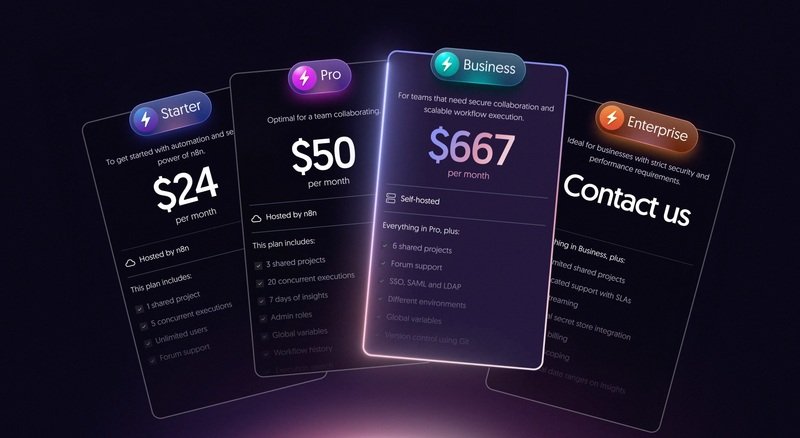
The broad picture is clear. n8n offers free self-hosting and paid cloud plans through n8n Cloud. Pricing references include a Starter Plan, a Professional Plan, and Enterprise Custom Plans, with cited ranges such as $50–100/month for professional-tier usage. The real difference, though, is not only price. It is who manages the platform, where it runs, and what operational controls are required.
Teams evaluating n8n pricing, n8n cloud pricing, or n8n price should look past subscription labels. volume, SLAs, executions, subscription structure, and infrastructure costs change the total picture. A CLI-driven manual setup with Postgres, Kubernetes, RBAC, SSO, and internal collaboration demands a different budget conversation than a small cloud deployment stored in an EU cloud for straightforward internal use.
| Model | Setup Style | Operational Notes | Commercial Framing |
| Self-hosted | Manual setup via server, container, or CLI | Higher infrastructure costs, but offers more control | Often starts with free self-hosting |
| Managed Cloud | Vendor-managed | Easier auto-scaling and less operational overhead | Part of paid cloud plans |
| Professional Tier | Managed or structured paid usage | Suited to larger executions and team needs | Professional Plan |
| Enterprise | Custom environment | Supports SLAs, advanced security, and governance | Enterprise Custom Plans |
What Are the Limitations of n8n?
n8n’s limitations usually appear when workflows become very large, very messy, or operationally under-owned.
In technical terms, n8n can feel slow or inefficient when pushing millions of data rows through messy workflows. A design that works cleanly for modest automation can become harder to maintain if teams skip naming nodes, leave tangled branches, and build without review discipline.
- Technical Limits: heavy throughput, large datasets, and data-heavy flows can stress execution patterns.
- Operational Limits: DevOps knowledge, backups, updates, and Redis workers become real concerns in production.
- Organizational Limits: beginners may struggle if governance is loose and a workflow becomes mission-critical for a complex enterprise.
- Lifecycle Limits: testing expectations rise quickly once automation becomes business infrastructure.
From experience, the biggest limitation is not raw capability. It is whether a team treats workflow design as software with ownership, or as a one-time convenience script.
What Is n8n Used For?
n8n is used for connecting apps, APIs, and databases so repetitive work can run automatically inside structured workflows.
The short answer covers the core: connect apps, link APIs, work across databases, reduce repetitive tasks, and support syncing data and sending alerts. The longer answer is that n8n works especially well when those tasks involve AI-powered workflows but still need visibility and complex code only where necessary.
That is why searches for what is n8n often turn into operational questions rather than abstract ones.
Is n8n Free?
n8n is free in self-hosted form, while managed usage depends on paid cloud plans.
A self-host setup on your own server or local machine can keep software access free. A managed version through n8n Cloud shifts the model toward paid plans, with value tied to scaling, collaboration, and added enterprise features.
The word “free” is accurate only when the operating context is also clear.
Is n8n Open Source?
n8n is source-available rather than fully open source in the strict licensing sense.
n8n uses the SUL, which is a fair-code model rather than unrestricted open source. That means personal use and many forms of business use are allowed, but reselling, embedding, and some commercial SaaS usage require attention to the license terms.
That is why this question keeps appearing next to deployment research.
Can You Build AI Workflows in n8n?
Yes, n8n can build AI workflows by chaining model calls, app actions, and validation steps inside one flow.
n8n supports AI nodes, connections to large language models, and links to providers such as OpenAI and Anthropic. Teams can build workflows with chained nodes for summaries, data processing, question answering, and controlled AI agents.
That is where n8n stops being simple automation and becomes operational AI.
How Do You Install n8n?
n8n can be installed through Docker, npm, or managed cloud setup.
For hands-on deployment, Docker and npm are the direct routes, and the cited install command examples include container and package-manager paths around n8nio/n8n. If a team wants a managed setup, Cloud avoids server operations.
That is why n8n download research usually becomes a hosting decision.
Is n8n Better Than Zapier or Make?
n8n is better for teams that need flexibility, self-hosting, and code-level control, while Zapier or Make may suit lighter use.
For non-technical users, ready integrations and quick starts can favor Zapier or Make. For developers, self-hosting, complex logic, loops, conditions, custom code, and deeper flexibility often make n8n the stronger fit.
The better tool depends on the workflow, not the brand.
Can Enterprises Use n8n?
Yes, enterprises can use n8n when they need controlled automation across internal systems and AI-connected workflows.
The enterprise case rests on SSO, RBAC, role-based access control, audit logs, and scalable deployment tied to real data pipelines, marketing systems, and AI tools. The security posture becomes stronger when these controls are paired with suitable hosting and workflow review.
That is why enterprise evaluation usually starts with governance, not templates.
What Does n8n Stand For?
n8n is commonly described as standing for Node-to-Node.
The phrase Node-to-Node fits the structure because nodes connect tasks into automated processes inside a visible workflow. Whether treated as an abbreviation or brand shorthand, the name matches the product’s core model.
The naming is unusually literal, which helps.
Does n8n Require Coding Skills?
n8n does not require coding skills for many workflows, but code becomes useful as complexity rises.
Many workflows can be built visually, which lowers the entry point for people without formal coding skills. At the same time, JavaScript, TypeScript, custom code, and the ability to extend logic become valuable when complex automations move beyond simple app handoffs.
That dual path is part of why n8n appeals to mixed teams.
How Secure Is n8n?
n8n can be secure when teams use its credential handling, access controls, and appropriate hosting model correctly.
The security model includes encrypted credentials, environment variables, and operational data control in self-hosted setups, while n8n Cloud adds managed infrastructure expectations. Practical security depends on how teams configure access, review standards, and align deployment with their own risk model.
The tool provides the controls; teams still have to use them well.